|
-
Paper - use white, twenty-pound, 8
1/2 x 11-inch paper. Please do not not use erasable paper for your
final copy as it tends to smudge.
-
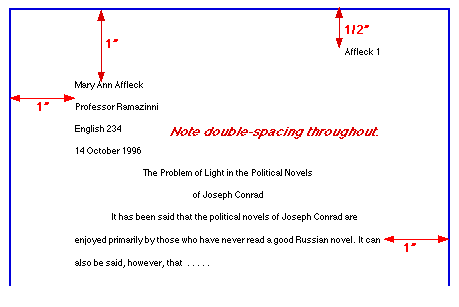
Margins - except for page numbers (see
below), leave one-inch margins all around the test of your paper (click
here to link to Setting Margins in Word '97). Paragraphs
- should be indented 1/2 inch (5 spaces). Set off quotations should
be indented 1 inch from the margin (10 spaces).
-
Spacing - double-space the entire paper
including the quotations, notes, and the list of works cited (click
here to link to Setting Spacing in Word '97).
-
Font size - use Times New Roman or
Arial font size 12 as the default font size for this paper (click
here to link to Setting Default Font Styles and Size in Word '97)
-
Heading and Title - Your research paper
does not need a title page. At the toop of the first page, at the
left-hand margin, type your name, your instructor's name, the course name
and number, and the date -- all on separate, double-spaced lines.
Then double-space again and center the title above your text. (If
your title requires more than one line, double-space between the lines.)
Double-space again before beginning your text. The title should not
be underlines, bold faced, or written in all capital letters. Capitalize
only the first, last, and principal words of the title. Titles might
end with a question mark or an exclamation mark if that is appropriate,
but not a period.
-
Page Numbers - Number your pages consecutively
throughout the manuscript (including the first page) in the upper right-hand
corner of each page, one-half inch from the top. Type your last name
before the page number. Make sure the page-number is always an inch
from the right-hand edge of the paper (flush with the right-hand margin
of your text) and that there is a double-space between the page number
and the top line of text. Do not use the abbreviation p. or
any other mark before the page number. Most word processing programs
provide for a "running head," which you can set up as you create the format
for the paper (click
here to link to Creating a Header/Footer in Word '97)
The sample below and the information above can be found at
the Capital Community-Technical
College website. You will also find information for formatting
Tables and Figures in your paper when you link to this site.
|
|



 E-Mail Webmaster Jenny Farr